• Home
  • Blog
  • Resume
  • Contact
  • Projects
  • Gallery
  • Amit’s Resume
  • About Nagpur
KEEP IN TOUCH

Concatenate function

Jul24
2007
Leave a Comment Written by admin

Oh, man, I can’t tell how useful that concatenate function is.

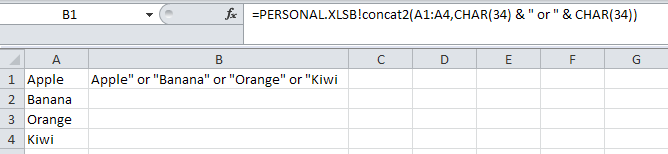
One repetitive use I found is to create OR/AND conditions for Access queries. I copy-paste the field values of a column from Access, do some filtering and my conditions are ready. Then I use this concatfunc to create a string to use in my Access query.

For example, look at this print screen:

The Range A1:A4 houses the string condition I want to use in my Access query to restrict the fruits from my data. In cell B1 I have the formula

=PERSONAL.XLS!concatfunc(A1:A4,CHAR(34) & ” or ” & CHAR(34))

, and the return string from this function is listed in cell B1.

Now, all you have to do is copy and paste this in Access criteria and put a quotation mark at the start and at the end of this string.

I have found one more use of this when I want to store some values in an Array, using the Array function in VBA.

One more print screen:

In this example, I insert a comma (CHAR(44) instead of string OR, and this function returns a string that I can use in VBA to store these values in an array using Array function, after adding a quotation mark, of course, at the start and at the end.

Related posts:

  1. Range Concatenation with a character
  2. Excel Function to check if text is palindrome or not
  3. Access VBA: Delete tables from Access database
  4. Stack Columns of Data on one column
  5. String Operations
Posted in String Operations, Useful Procedures - Tagged excel, UDF, VBA
SHARE THIS Twitter Facebook Delicious StumbleUpon E-mail
« Print Structures of dbf files in separate workbooks
» A function to reverse a string

No Comments Yet

Leave a Reply Cancel reply

Your email address will not be published. Required fields are marked *

*

*

You may use these HTML tags and attributes: <a href="" title=""> <abbr title=""> <acronym title=""> <b> <blockquote cite=""> <cite> <code> <del datetime=""> <em> <i> <q cite=""> <strike> <strong> <pre lang="" line="" escaped="">

Tags

Access Alt F8 Books boxplot cells charts count cursor dashboard data mining dbase design error excel excel functions export filter flip LaTex MS query Number Err ODBC pipes Press Alt F11 Public Sub python R random numbers Range Cells report scripting software sparklines SQL SQL server stack columns statistics stemming string tag cloud text mining UDF VBA visualization wildcard

Network

View Ashutosh Nandeshwar's profile on LinkedIn

Recent Comments

  • W. McNabb on The search key was not found in any record in Access
  • Manuel on The search key was not found in any record in Access
  • Wendy Naples on The search key was not found in any record in Access
  • larry on Access Export to Excel (2007)
  • Betty Chou on Projects

Related Posts

  1. Range Concatenation with a character
  2. Excel Function to check if text is palindrome or not
  3. Access VBA: Delete tables from Access database
  4. Stack Columns of Data on one column
  5. String Operations

EvoLve theme by Blogatize  •  Powered by WordPress nandeshwar.info